en

A KK8 app download search almost always ends in the same two questions. Is there an APK at all, and is the file you just found the real one?
Whatever the search says, KK8 APK download, KK8 app download APK, the latest version or a download APK for iOS, the questions do not change.
The answer is simpler than the search results make it look. KK8 runs as a mobile web app, so there is often nothing to install: you open the platform in a browser and keep an icon on the home screen. Android is the only place where an installable file enters the picture, and even there the sensible source is the platform itself.
Below is what the app is in practice, the Android route, the iPhone route, and the checks that keep a modified file off your phone.
On a phone, the platform loads as an H5 web app: the whole thing runs in the browser, with a bottom bar carrying Promotion, Check In, Home, Profile, and History once you are logged in (Sponsor sits there while you are logged out). That bar is what makes it feel like an app rather than a website, and it behaves the same whether you reached it through a browser tab or through an icon on your home screen.
The side menu shows a version label of v1.1.0. That is the web app build, not an APK number, so there is nothing to compare it against when you are searching for the latest version of a downloaded file. If you want an overview of the products that sit behind that bottom bar, from slots to live tables and the sportsbook, start with the overview of the products.
| Detail | KK8 |
|---|---|
| Format | Mobile web app (H5); the platform’s FAQ also describes an Android APK |
| Version label shown | v1.1.0, in the side menu, for the web app |
| iPhone and iPad route | Add to Home Screen from the browser |
| App store listing | None verified |
| Account | One UID works on every device |
| Support | Live Chat, stated as 24/7 |
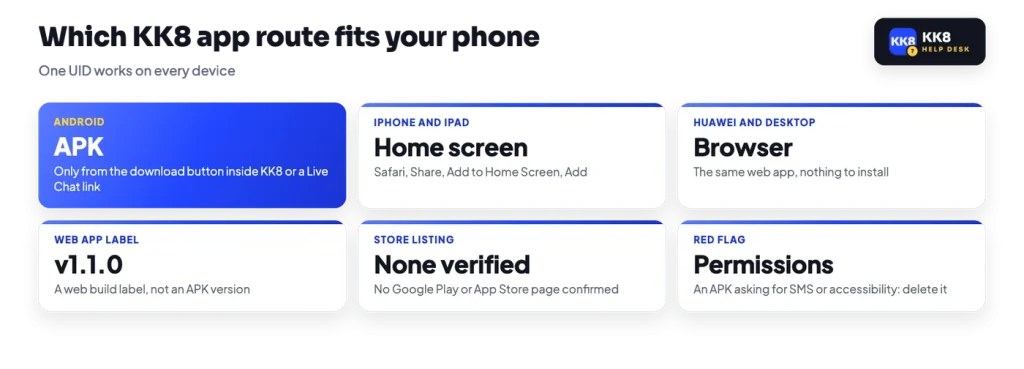
The platform’s FAQ sets out one legitimate path for Android, and it is the one to follow, because it rules out everything else. The steps it describes are:
No download button sits on the public pages you see before logging in, which is exactly why the search results fill up with re-uploaded files. So in practice the file comes from a download button inside the platform once you are signed in, or from a link that Live Chat gives you. A file from a search result, a Telegram channel, a file-sharing site or a copycat domain is not the same thing, even when the icon and the colours look right.
Two pieces of general background help here. First, installing an APK outside a store is sideloading, and Android will warn you about it; Play Protect may also flag an unknown installer. That warning is doing its job, and clicking past it on a file of unknown origin is a common way accounts get stolen. Second, a modified file, the kind advertised with extra credit or added features, is repackaged by someone who is not the operator. Whatever else it does, it has your login screen.
Before you continue
An APK that asks for SMS, contacts or accessibility access does not need those permissions to show you a casino lobby. Cancel the install and delete the file.
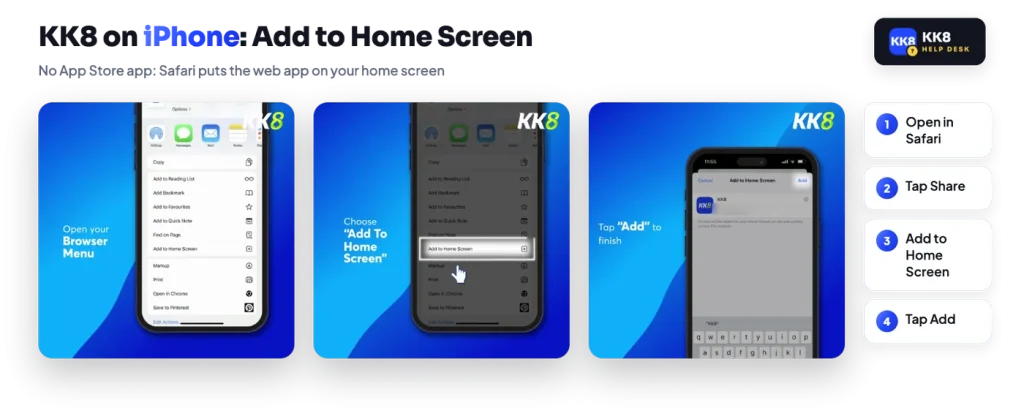
iOS has no download step, because there is no verified App Store app for the platform. The documented route is the browser one, and it gives you the same icon-and-full-screen result as an installed app.
This is why a KK8 app iOS search turns up no store page. If you do find something presenting itself as the iPhone edition, nothing confirms it as the operator’s, and sideloading on iOS is far more awkward than tapping Add to Home Screen. The home-screen icon costs nothing, uses no storage for a separate build, and cannot drift out of date the way a downloaded file can.
Devices without Google services are straightforward: the web app is just a website, so it opens in whatever browser the phone ships with. As a rule, Chrome and most Android browsers also carry an Add to Home screen item in their menu, which produces the same shortcut behaviour described above for iPhone.
Desktop and laptop work the same way, in a normal browser window, with the full lobby rather than the phone layout. Nothing is tied to one device. The account lives on the platform, not on the handset, so you can open the home-screen icon on the way home and finish on a laptop with the same UID.
If you would rather skip the install question entirely, open the platform in your browser and add the icon to your home screen.
KK8 runs several sites of its own, and copies of those sites exist. That combination is what makes phone installs risky: a fake looks identical, and it only needs you once. A short routine covers most of it.
One more habit helps. An OTP is a single-use code tied to one action, so no real support agent needs you to read one out, forward it or paste it into a form you did not open yourself.
Whichever route you took, the first screen is the same login screen: UID, Password, Log In, with Forgot UID or Password underneath. If you signed up with the one-click method, the UID and password shown at sign-up are your only key unless you later bind a phone number, because recovery runs on phone and OTP. The full UID login steps cover that, along with what to do when the password no longer works.
No UID yet? Create an account in the browser first, save the UID and password the system shows you, then add the icon or install the file. Doing it in that order means you are not hunting for credentials in the middle of a setup.
When an icon or an installed app stops opening, work through it in this order. Clear the browser cache and site data, then load the platform in an ordinary browser tab to see whether the account itself is fine. If the tab works and the icon does not, delete the icon and add it again. If you installed an APK and it now fails or behaves oddly, uninstall it and go back to the browser version, which is always available. Live Chat, stated as 24/7, can confirm whether the platform is in maintenance before you spend longer on your own device.