en


Topping up on KK8 is the straightforward half. Getting money back out involves a few more conditions: a turnover figure, the Restore step on the Main Wallet card, and a bank account in the same name as the account itself.
This page sets out the deposit channels and limits printed in the cashier, the RM100 floor on bank withdrawals, the USDT rules that run through Live Chat, and the checks to make before you tap Withdraw. All figures below are the ones the platform publishes in its own terms and screens.
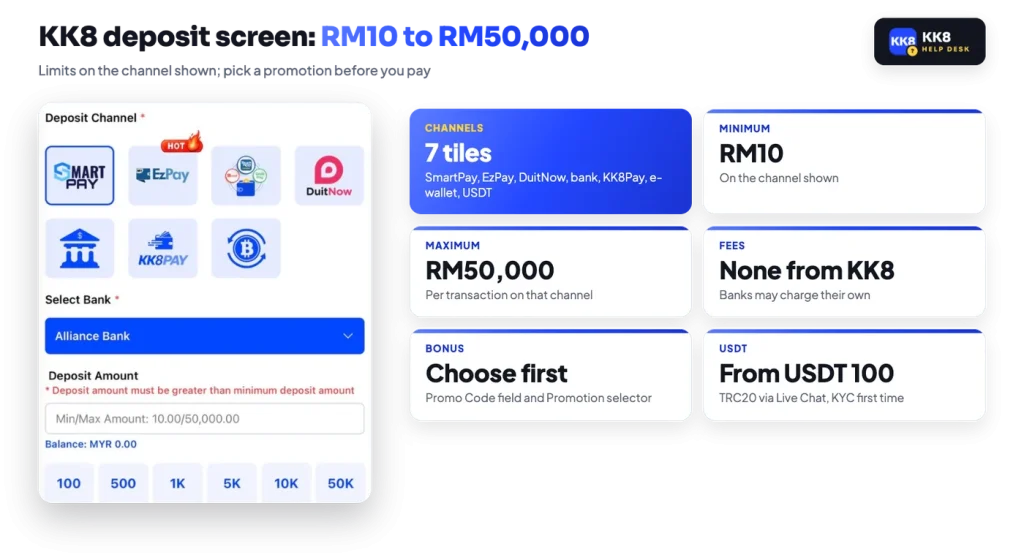
The cashier opens from the Deposit button on the Main Wallet card. A row of Deposit Channel tiles sits at the top, then Select Bank, then the amount field with its own Min and Max printed underneath it. For Malaysia the supported list covers EZPAY, Touch ‘n Go, FPX, local bank transfer and BTSE, and the tiles on the screen group those routes together.
| Deposit channel | How it works on the platform |
|---|---|
| EzPay | Routes through FPX online banking or Touch ‘n Go, and carries the HOT label on its tile. |
| SmartPay | Payment channel tile; choose your bank under Select Bank before entering an amount. |
| DuitNow | Malaysian transfer rail, with its own walkthrough in the platform’s User Guide. |
| Bank transfer | Local bank transfer; pick your bank under Select Bank. |
| KK8 Pay | The platform’s own channel, shown on the tile as KK8PAY. |
| E-wallet | A separate e-wallet tile sitting alongside the bank channels. |
| USDT | Crypto tile; the TRC20 process is handled through Live Chat, covered further down. |
Limits belong to the channel, not to the account. On the channel shown on the deposit screen, the line under Deposit Amount reads 10.00 to 50,000.00, so the KK8 minimum deposit there is RM10 and the ceiling is RM50,000 per transaction. Preset amount buttons of 100, 500, 1K, 5K, 10K and 50K sit under the field. Because each channel prints its own pair of numbers, read that line again whenever you switch tiles.
Two fields decide whether a bonus attaches to the money. A Promo Code box takes a platform code, and a Promotion selector lets you pick the offer the deposit should feed. Choose before you pay, not after, and only one promotion at a time. The 388% welcome bonus is the exception to the self-serve route, since it is credited through customer support once the payment has been verified.
There is also a club route for larger sums. KK8 states that a VIP express deposit, arranged through support, completes within 1 minute for amounts up to RM30,000 per transaction, which is the one VIP-adjacent perk the platform puts a figure on.
The cashier, the promotion selector and the turnover bar all sit on the same Main Wallet card.
Fees come in two layers: what the platform charges, and what sits outside it.
Stated
KK8 will not charge members for deposits or withdrawals.
In practice
Nothing is added on the standard channels, but your bank or e-wallet can apply its own transfer charge, and the published terms keep the right to recover reasonable costs. Treat the no-fee line as a statement about the platform’s side of the transaction only.
Crypto behaves differently, because the network itself takes a cut. A USDT deposit has to clear USDT 100 after the gas fee is deducted, so send slightly more than 100 if you want 100 to land. On the way out, the gas fee on a USDT withdrawal is covered by the operator. In general, a blockchain fee is paid by whoever sends the transfer, which is why it comes off your deposit and is covered by the operator on a withdrawal.
Crypto on this platform is not a self-serve tile you fill in yourself. It runs through Live Chat, which also means you ask for the current address each time instead of reusing an old one. TRC20 is the Tron network standard for USDT, and as a rule a transfer sent on the wrong network or to a mistyped address cannot be recalled by anyone.
The published rules, in the order they matter:
That 1x turnover rule is easy to miss. A plain USDT deposit still has to be staked once before it can leave, and a deposit that was tied to a bonus follows the much larger requirement of that bonus instead.
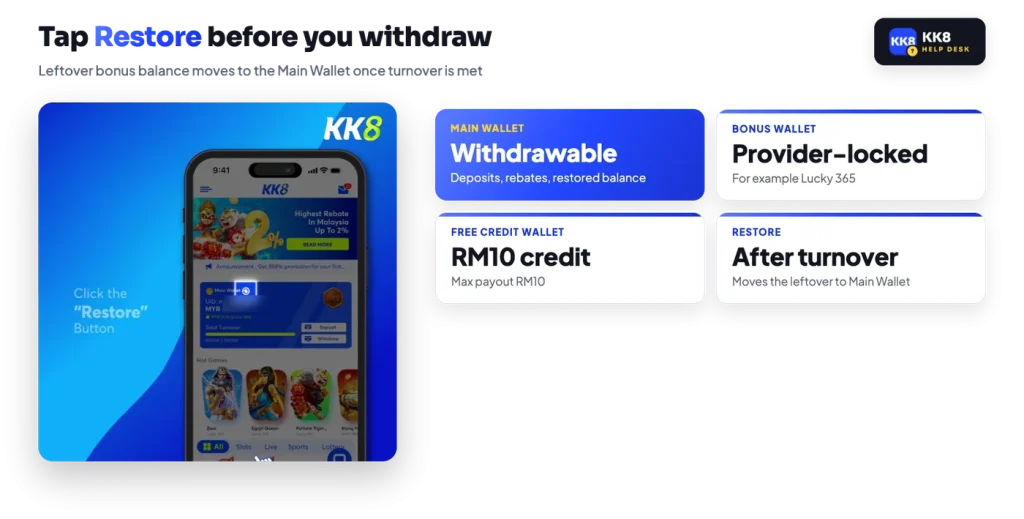
The account holds three balances, not one. The Main Wallet is the withdrawable one. A Bonus Wallet is tied to the provider of the bonus that created it, for example Lucky 365. A Free Credit Wallet holds credit from the free credit offer. When you open a game the platform asks you to pick, under Select Your Prefer Wallet, which balance the session will play from.
The Main Wallet card carries the UID, the balance, a turnover progress bar reading Total Turnover against its target, the Deposit and Withdraw buttons and a Restore icon. That progress bar is the number to watch, because the published bonus turnover rules decide the target and the bar decides whether you have reached it.
Restore is the step that is easiest to overlook. Once a bonus has met its total turnover requirement, tapping it moves the leftover balance from the bonus wallet into the Main Wallet. Until that happens the money is not in a balance you can withdraw from, no matter how the total looks on the card.
Turnover itself can be audited from History on the bottom bar. The game transaction list filters by date and provider, and the ! icon opens Main Turnover for the period you have selected. Rebates land in the Main Wallet automatically and carry 1x turnover of their own before withdrawal, and only Main Wallet bets earn them in the first place.
Withdrawals start from the same card as deposits, and the screen itself tells you whether you are clear to proceed.
Before you continue
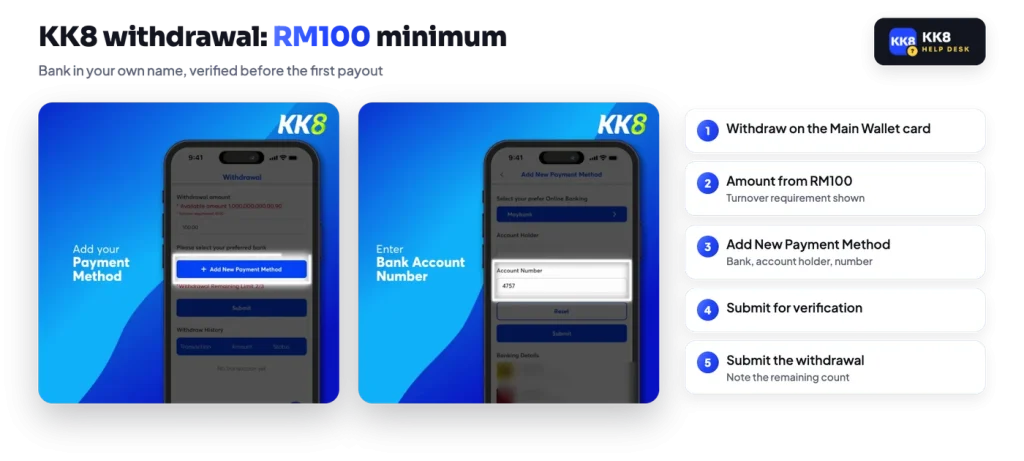
The account holder name on the withdrawal bank must match the name on the KK8 account, or the withdrawal is refused. Fix the mismatch through Live Chat rather than submitting again.
Two more conditions sit in the terms. Withdrawals are paid in the currency you deposited in, so a MYR account is paid in ringgit. The payment processor can also hold a payment where there is suspicion attached to the account or the transaction. No payout time is published anywhere on the platform, so treat the request as submitted rather than as scheduled, and keep the transaction reference from your Profile history in case support asks for it.
A blocked payout tends to trace back to one of a short list of conditions, and each one has a fix.
One habit protects all of this. Reach the cashier from your own bookmark or the home-screen icon rather than from a link someone sends you in a chat, and never type your UID, password or an OTP on a page you arrived at that way. Copies of the platform exist, and the broader safety checks are set out in our overview of the platform.
If a request is sitting without an explanation, Live Chat is the only published support route, and it runs around the clock. Have your UID, the amount, the channel and the time of the request ready before you open it.