en


KK8 login is built around a UID. There is no phone number or e-mail address in the sign-in box. You type a UID, the account identifier the platform created when you registered, and the password tied to it.
It is the same screen whether you searched KK8 log in, a casino login or a slot login: one UID covers the casino, the slots, the sportsbook and Ekor.
That one detail explains most failed sign-ins. If the UID was never saved, the login screen has nothing to accept, and no amount of retyping a phone number will help.
Below are the sign-in steps, the recovery routes for a forgotten UID or password, and the fixes for errors that look like a locked account but have a simpler cause.
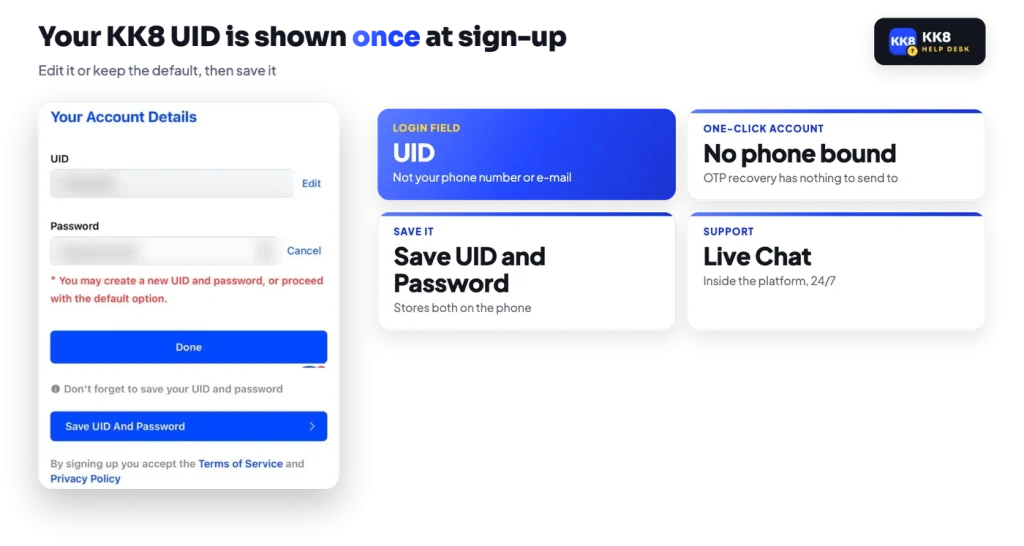
At registration the platform generates both credentials for you and shows them on an account details screen. You can tap Edit there to set a UID and password of your own, or keep the system defaults and carry on. The same screen offers Save UID and Password, which stores them on the phone, and it tells you plainly not to lose them.
The UID is what the login field wants. It is not your name, not your mobile number, not an e-mail address. Registering by phone or e-mail does add a verified contact point to the account, because those methods ask for the number or address plus an OTP, but the daily sign-in still runs on UID and password.
Enter it exactly as it appeared on that screen, and paste it from where you stored it rather than retyping it from memory.
The sequence is short once the credentials are in hand.
Two other links sit on that same screen. Forgot UID or Password starts recovery, and Create Account opens registration instead. If you find yourself hunting for the address every time you want to sign in, installing it as a home-screen app removes that step and reduces the chance of landing on a copy of the sign-in page.
Have your UID and password ready, and enter them only on the platform’s own login screen.
Recovery runs through the phone number attached to the account, not through an e-mail reset link. The platform sends a one-time code to that number, confirms it, then shows you the UID or UIDs it holds. Nothing in this route asks for your password, so if a page claims to need it in order to show your UID, you are not on the platform.
Keep in mind
One phone number can show more than one UID. Log in with the one that holds your balance.
If the password has gone too, run the password route next from the same entry point rather than guessing at the login screen.
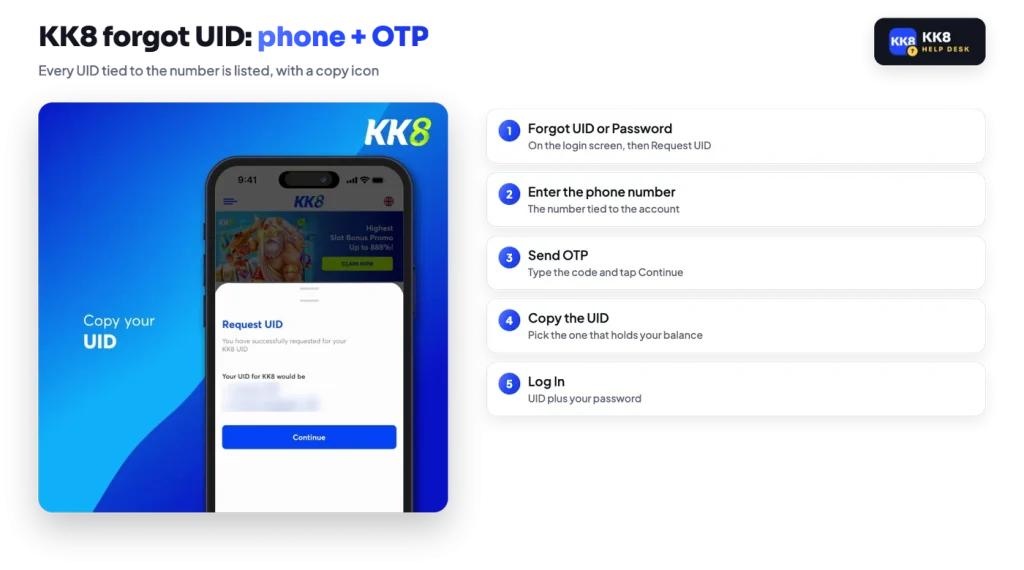
The password route starts at Forgot UID or Password as well. You confirm the phone number, enter the OTP sent to it, then set a new password. From there you sign in normally with your UID and the password you just chose.
Once you are inside the account, a deliberate change is a different path: open Profile, then My Account, then Change Password. Enter the old password, type the new one twice, and tap Submit. A Password Changed confirmation appears.
It makes sense to do that straight after any recovery, so the credential you end up with is one you chose rather than one that passed through an OTP screen. As a general rule, a password reused from another site is the weakest part of any account, because a leak somewhere else becomes a login somewhere new.
Stated
One-click sign-up needs nothing but a tap.
In practice
It also leaves no phone or e-mail on the account to recover with, so the UID and password shown on the account details screen are your only key until a phone number is bound.
That is the trade-off behind the fastest registration route. The OTP recovery described above has to send a code somewhere, and a bare one-click account gives it no destination. The practical consequence is simple: if you chose one-click sign-up, the details on that first screen matter more than they would elsewhere, and Save UID and Password is the step not to skip.
If your account was created that way, check your Profile for a place to add and verify a mobile number. Binding one converts your account to the same recovery footing as a phone registration. Where the screen does not offer it, the platform’s 24/7 Live Chat is the only remaining channel, and sorting it out before you need it is far easier than after.
Sign-in failures come down to a handful of causes, and only one of them needs support.
One category sits outside self-service. The terms allow one account per person and treat multiple accounts, hedging and the same bonus being farmed across accounts as abuse, with bonus funds and winnings removed and the account closed. Changing personal details while a promotion is running forfeits the bonus profits from it. If an account has been restricted on those grounds, no recovery screen will reopen it, and Live Chat is the only route to an explanation.
KK8 runs several sites of its own, and copies of its sign-in page exist that it does not control. The defence is unglamorous but effective: reach the platform through an address you saved yourself or through the icon on your home screen, and never through a link forwarded in a chat group. Credentials typed into a copied page are gone the moment you submit them.
Support is a 24/7 Live Chat inside the platform itself, which is also where you raise a lock, a missing UID or a deposit limit request. No real support agent will ask for your password or read an OTP back to you in a messaging app, because neither is needed to help you. Treat any request for either as the end of the conversation.
For a wider picture of how the account, the wallets and the promotions fit together, start from our overview of the platform and work outwards to the section you need.