en


A KK8 register flow is shortest with the one-click option, because that route asks for no personal details at all. What it does hand you is a system-generated UID and password, and those two strings are what you log in with afterwards.
This page walks through the three sign-up methods, the exact screens you will see, what the terms commit you to the moment you create an account, and where the RM10 free credit code goes once you are in.
The platform offers three registration methods, and the choice matters less for signing up than for what happens months later when you forget something. The flow Malaysians search for as cara daftar KK8 is the same one in all three cases: same puzzle, same account details screen, same Save UID and Password prompt at the end.
One-click creates the account immediately. No name, no number, no address, no e-mail. The system generates a UID and a password, shows them to you once on the account details screen, and that is your account. It is the shortest route in and the least forgiving, because password resets and UID retrieval both run on a phone number plus an OTP. With nothing bound to the account, the only thing standing between you and a locked-out balance is the pair of strings you saved.
The phone tab asks for your mobile number and sends an OTP through the Request OTP button. You enter the code, then continue to the same account details screen. Binding a number at sign-up is what makes the self-service recovery route work later: if the password goes, the number receives a fresh OTP and the screen that lists every UID tied to that number is how you get back in. If you ever need that route, the steps for a forgotten UID are set out where we cover how to recover a UID.
The e-mail method works the same way, with an address in place of the number and the verification code sent there. Both phone and e-mail registration verify a contact channel you control, which is the practical difference from one-click.
| Detail | KK8 |
|---|---|
| Sign-up methods | One-click, phone number, e-mail |
| Verification at sign-up | Slide puzzle; OTP for the phone and e-mail methods |
| Minimum age | 18 and above |
| Accounts per person | One |
| Currency in the Malaysian section | Ringgit (MYR) |
| Free credit code | KK8MYFREECREDIT, new members, once |
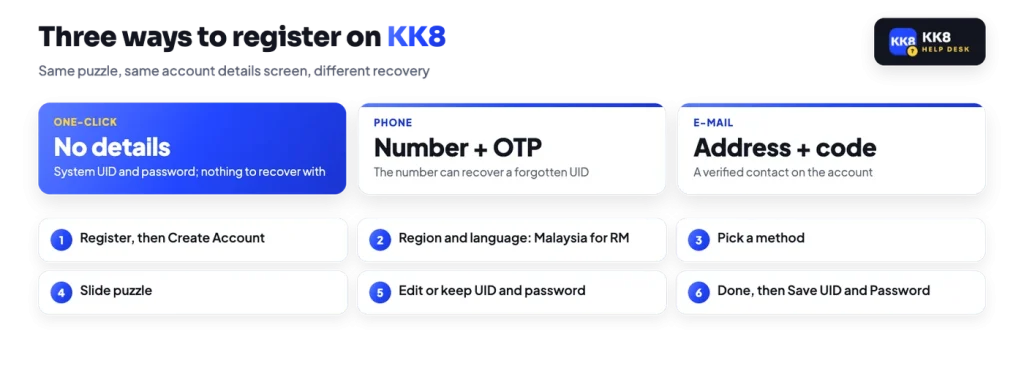
The sequence below follows the platform’s own sign-up screens from the first tap to the point where your details are stored on the phone.
Before you continue
The account details screen is where your UID and password are shown to you. Save them before you close it, because an account with no phone or e-mail bound cannot use the OTP recovery route.
Nothing on that screen is a formality. A UID is not an e-mail address you can guess your way back to, and the recovery path exists only for accounts with a contact channel attached.
Sign-up runs in the browser, so there is nothing to install before you start.
On first visit the platform asks which region you are in, with Malaysia, Singapore and Bangladesh as the options. These are separate sections rather than one shared lobby, so the Malaysian section is the one that runs in ringgit, prices its promotions in RM and lists Malaysian banking channels at the cashier. Pick Malaysia if you intend to deposit and withdraw in MYR.
Language is a separate setting and can be changed afterwards from Profile > General > Language, so choosing a region is not the same as locking yourself into one interface language. Withdrawals are processed in the currency you deposited in, which is another reason to get the region right at the start rather than work around it later. If you want the wider picture of what sits inside the lobby first, start with an overview of the platform.
Here is the part to settle during a one-click sign-up: the method asks for no personal details, but the terms still require accurate personal information, and the name on the bank account you withdraw to has to match the name on the gaming account. Third-party deposits are refused on the same principle. So if you expect to withdraw at any point, set your real name on the account and use a bank account in that same name, rather than discovering the mismatch at the cashier.
The rest of the sign-up commitments are short:
Multiple accounts, hedging and deposit-withdraw cycling to farm bonuses are all listed as irregular play, with bonuses and winnings removed and the account closed.
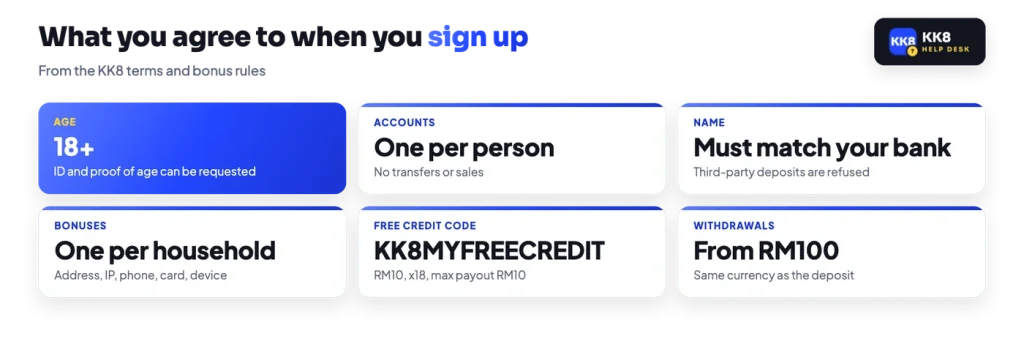
Deal with the free credit before you deposit anything, because it cannot run alongside another promotion. The platform’s public code is KK8MYFREECREDIT, entered either in Code Redemption under Profile > General or in the Promo Code field on the deposit screen. It releases RM10 of free credit for new members, once per person. The conditions are tight: x18 turnover on the bonus, which works out to RM180 of play, with the payout capped at RM10. Since bank withdrawals start at RM100, that RM10 cannot leave the account on its own. Only slot games count, and King Midas, RSG, AskMeSlot and NextSpin are excluded, as are non-slot and arcade titles. The full exclusion list and the other standing offers sit with the free credit terms.
One more thing before your first top-up. Deposit bonuses are selected at the moment of depositing, through the Promotion selector on the deposit screen, so decide whether you want a welcome offer attached before you send money rather than after.