en


The KK8 VIP Club lives inside the account rather than on the public marketing pages, which is why searches for tier tables come back empty. What is visible is the structure: four tier tabs, one upgrade rule stated in ringgit, and two progress meters that tell you how close you are.
This page explains where to find all of it, what the screen asks of you, and which rewards are open to every member regardless of tier.
Two routes lead to the same place. The side menu lists VIP Club among its entries, and the account area carries a VIP section of its own. Either way you land on a card that names your current tier and the next one above it.
Below the card sit two further links, VIP Lounge and Leaderboard. What the Lounge holds is not documented outside the account. The Leaderboard is a ranking display; the brand’s public version lists top rebate earners with daily updates at 12 PM, which makes it marketing rather than a statement about your account.
Nothing here is readable while logged out, and that is the main thing to understand before hunting for a published tier chart. The numbers are written against the tier you hold, so they are served to your account and not to a public page.
The tab bar runs Bronze, Silver, Gold and Platinum, with space for further tabs to the right of Platinum. A new account starts at Bronze.
Tapping a tab shows that tier, and whatever the platform states about a level is found there, inside your own account. Read the tab above yours before committing any money to reaching it.
| Detail | KK8 |
|---|---|
| Tiers shown in the account | Bronze, Silver, Gold, Platinum, with room for further tabs |
| Upgrade basis | Topping up to a stated target within the month |
| Period measured | The current month |
| Progress meters | Minimum Deposit and Minimum Turnover |
| Express deposit claim | Within 1 minute, up to RM30,000 per transaction, via support |
| Where thresholds appear | Inside your own account only |
As a rule, loyalty ladders of this shape measure a window of activity rather than a lifetime total, and the KK8 VIP screen follows that pattern by naming the current month. Treat any figure you read there as belonging to that month only.
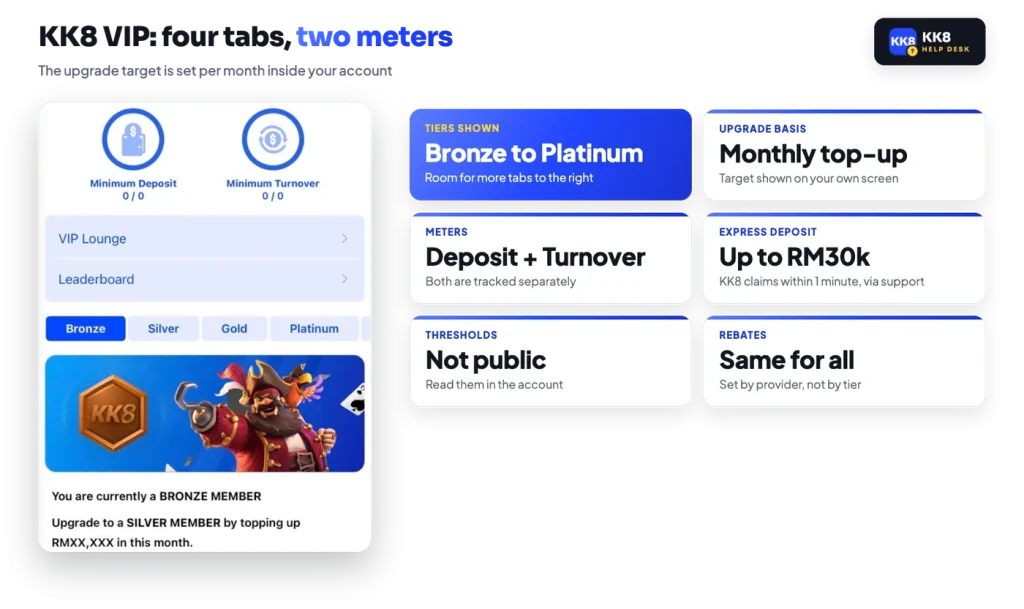
The upgrade line on the card is direct. A Bronze member is told to reach Silver by topping up a stated amount this month. The amount is filled in on your own screen.
Underneath, two meters track progress separately. Minimum Deposit counts what you have paid in. Minimum Turnover counts what you have staked. On a fresh account both read zero against zero.
That split matters. Depositing alone may satisfy one meter and leave the other short, because money sitting in the Main Wallet is not turnover until it is staked. Before adding funds with a tier in mind, read both bars and work out which one is behind, then check the limits on your chosen route under the deposit channels so the top-up is not split across more transactions than you intended.
Keep in mind
The upgrade target is set per month, and the Minimum Deposit and Minimum Turnover meters show how far along you are. Read both before depositing with a tier in mind.
Thresholds, tier rewards and any downgrade rule are not published outside the account. The practical instruction is simple: open the tab for the tier above you and read your own numbers.
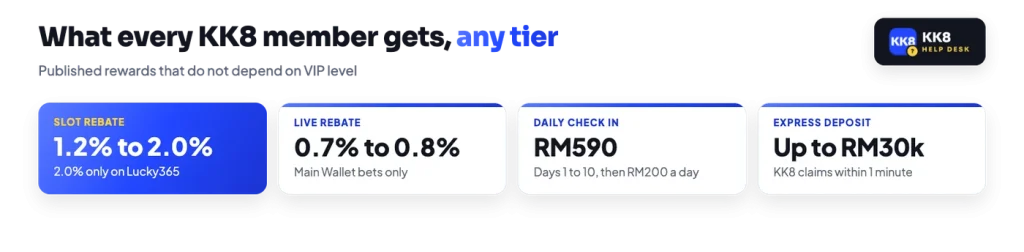
The one VIP-adjacent perk the operator states in public is an express deposit route. KK8 describes it as completing within 1 minute and handling up to RM30,000 in a single transaction, arranged through contact with support rather than through the standard cashier tiles.
Two things need separating here. First, this is a claim about deposits, not withdrawals. No payout time is published anywhere for withdrawals, so nothing about express deposits should be read as a statement about how quickly money comes back out.
Second, it runs through a conversation with the platform’s Live Chat. Support will never need your password or an OTP to set up a deposit, and no legitimate request will ask for them.
Several of the standing rewards are open to every member, so they are not a reason to climb. The daily slot rebate is set by game provider, reaching up to 2.0% on Lucky365 and sitting between 1.2% and 1.5% on the other slot studios. Live casino rebates run 0.7% to 0.8%. Both are credited to the Main Wallet automatically and carry 1x turnover before withdrawal.
Rebate is earned on Main Wallet bets only. Bets placed with bonus money earn nothing, blackjack and arcade titles are excluded, and hedged play can cut the rate to 0.5%.
The ladder of daily check-in rewards is also tier-neutral, climbing from RM2 on day one to RM200 from day ten, with a Main Wallet turnover requirement attached to each day.
If you are weighing what the account gives you overall, it helps to see how the platform’s sections fit together before treating a tier as a goal.
Progress on this ladder is measured by what you put in, which makes it a record of spending rather than an achievement to pursue. The sensible order is to decide your own monthly ceiling first, then see which tier that spending happens to reach, rather than picking a tier and funding it.
In general, a figure written on a screen next to the word upgrade is designed to pull the next deposit forward. Set the limit before you look at it.
The platform does not document in-account deposit limits or self-exclusion tools, so there is no switch to describe here. If you want a cap or a break from play, raise it with Live Chat, and keep in mind that the ladder is capped by your own budget long before it is capped by any tier.
Your current tier, the top-up target for the next one and both progress meters are all on the VIP screen in your account.